To
access the proofing settings described in the post above, follow these steps:
1. Click the Office button (2007 version) or File tab (2010, 2013 versions).
2. Click the Word Options button (2007) or Options link on the left side panel
(2010 and 2013).
3. Click the Proofing link on the left side panel.
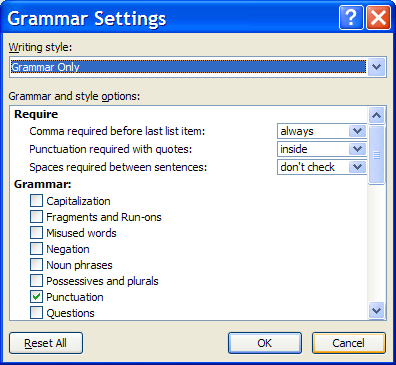
4. Click the Settings button; Grammar Settings
dialog box displays (see Figure 1).
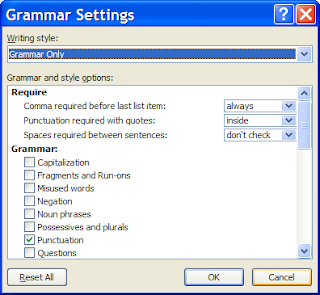 |
| Figure 1 |
Commas and Lists
In
the Grammar Settings dialog box under the Require category, Comma required before last list item is
the setting to change.
The
default is don’t check; although for
consistency, I recommend changing it:
- If
you want to always include the comma before the conjunction, change the setting
to always. For example, this sentence
would be flagged as an error with the always
setting because the comma is missing after Mary:
The manager invited Jim, Susan, Mary and
Joe to lunch to celebrate their promotions.
- If
you never want to include the comma before the conjunction, change the setting
to never. This sentence would be
flagged as an error with the never
setting because the comma is to be omitted after Mary: The manager invited
Jim, Susan, Mary, and Joe to lunch to celebrate their promotions.
This
setting is typically correct. However, when a second and is introduced in the list, Word doesn’t detect an error for
either setting (always or never). Here’s an example where the
serial comma would help the reader understand the sentence:
The restaurant will
promote the following pies this week: coconut, peanut butter and chocolate and
marshmallow.
Without
the comma, do you know the flavor of the pies? Is there a peanut butter and
chocolate pie or a chocolate and marshmallow pie? A comma will make it clear.
Word doesn’t flag the missing comma for the always
setting, or if the second comma was placed, Word wouldn’t flag it as an error for
the never setting. Be careful with
these types of lists, even though they're not common.
Innies or Outies? Punctuation
Placement with Quotation Marks
In
the Grammar Settings dialog box under the Require category, Punctuation required with quotes is the
setting to change.
Again,
the default is don’t check; so if you
want to have periods and commas checked for their placement with quotation
marks, change the setting to either inside
or outside.
Sometimes,
the error isn’t flagged, although it depends on another punctuation setting. If
the Punctuation—stylistic suggestions is not selected, the Punctuation required with quotes is consistently correct. If you
use a lot of quotation marks, you may want to be sure the punctuation style
setting is not checked. See the settings for Punctuation—stylistic suggestions
below.
When the period is placed inside
of the quotation marks, some Americans think it “looks wrong.” For
American English, this is the correct way to punctuate it.
Incorrect Punctuation for Grammar
Category
In
the Grammar Settings dialog box under the Grammar category (see Figure 1), click
the Punctuation check box to detect errors on the following items:
Incorrect use of commas.
Missing commas are not detected; so if you’re relying on Word to tell you where
to place commas, this setting will not help you. Word will occasionally guide
you if a comma is not placed in its proper position with this setting, although
this setting is not reliable. Because there are so many reasons to use commas,
it’s easy to see why detecting comma errors by a computer is difficult.
Consequently, you need to know comma rules. Sorry!
Incorrect
use of colons. Colons are used to introduce lists and long
quotations. A colon is not used to introduce a list if it follows a to be verb (is, are, was, were, being, been, etc.) or a preposition (for, with, etc.), even if the list is
vertical.
For example, this list follows a to be verb. An effective to-do
list must be: simple, short, and real-world tested. Word will correctly
detect this error ; however, the following error is not detected but should
be.
An effective to-do
list must be:
- Simple
- Short
- Real-world tested
We need to consider
new positions for: Accounting, Sales, and Production. Word will flag this
error correctly because the list follows a preposition, although once again, it
doesn’t detect it when the list changes to a vertical format.
Sometimes
Word detects the incorrect use for long quotations; and sometimes it doesn’t. If
you forget to use the colon, Word may or may not flag the error.
End-of-sentence
punctuation. This
setting detects an error when a question ends with a period. Here are the
examples it flags correctly:
The speakers were
to focus on the presentation, weren’t they.
Are you going to
the meeting.
Word suggests a question mark for the above questions.
However, Word incorrectly suggests a question mark to be used when the
statement is a polite command, which doesn’t use a question mark: Will you please answer the following questions.
Multiple spaces
between words. This
setting consistently flags more than one space between words in a sentence.
Semicolon used in
place of a comma or colon. As with most settings in this category, Word doesn’t
always detect errors where semicolons are used when a comma or colon should be
used. It’s not reliable.
Incorrect Punctuation for Style
Setting
In
the Grammar Settings dialog box under the Style category (see Figure 2), this
setting detects errors for the following:
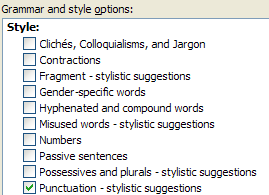 |
| Figure 2 |
Unneeded commas in
date phrases. This
setting correctly flags commas placed between month and day (September, 24) and
month and year (September, 2013).
Informal successive
punctuation marks. Errors
flagged include more than one exclamation point (versions 2010 and 2013, not
2007), question mark, comma, and apostrophe. Double periods and more than four
periods are flagged, but not three or four periods.
Missing commas
before quotations. This
setting doesn’t reliably detect all errors. For example, She said “I like being in control.” is not flagged, although She said “I am happy to do this
presentation.” is flagged. Both examples should have a comma after the word
said.
Word’s
FAQs state the following about grammar proofing in Word: “…you may experience
some amount of ‘false’ or ‘suspect’ flagging and subsequent wrong suggestions;
however, the grammar proofing tool in Word 2002 and later versions is vastly
improved over earlier versions of Microsoft Word.” That’s true, and that’s why it’s
helpful to know the grammar rules.
Even if these punctuation settings don’t work very well,
some of the other grammar settings do help you proofread and edit your
documents. Stay tuned for more exciting instructions to come. In the meantime,
celebrate National Punctuation Day (Tuesday, September 24) by learning punctuation rules (that way, you
won’t have to suffer through these grammar checker settings).